DTF Printing Guides DTF White Underbase Explained: Why It Matters

DTF White Underbase Explained: Why It Matters

DTF White Underbase Explained: Why It Matters

What Is a White Underbase in DTF Printing?

Every DTF transfer includes a hidden layer that most customers never think about — the white underbase. This layer of white ink prints beneath your design colors and serves as the foundation that makes DTF transfers work on any garment color. Without it, your vibrant reds would look muddy on a black shirt, and your detailed logos would disappear into dark fabric.

Understanding how the white underbase works helps you make better design decisions, troubleshoot quality issues, and get the most out of your DTF transfers. At InkMerge, our printing process automatically optimizes the white underbase for every design, ensuring accurate colors and sharp details on any garment color — all at $0.02 per square inch.

How the White Underbase Works

The Printing Sequence

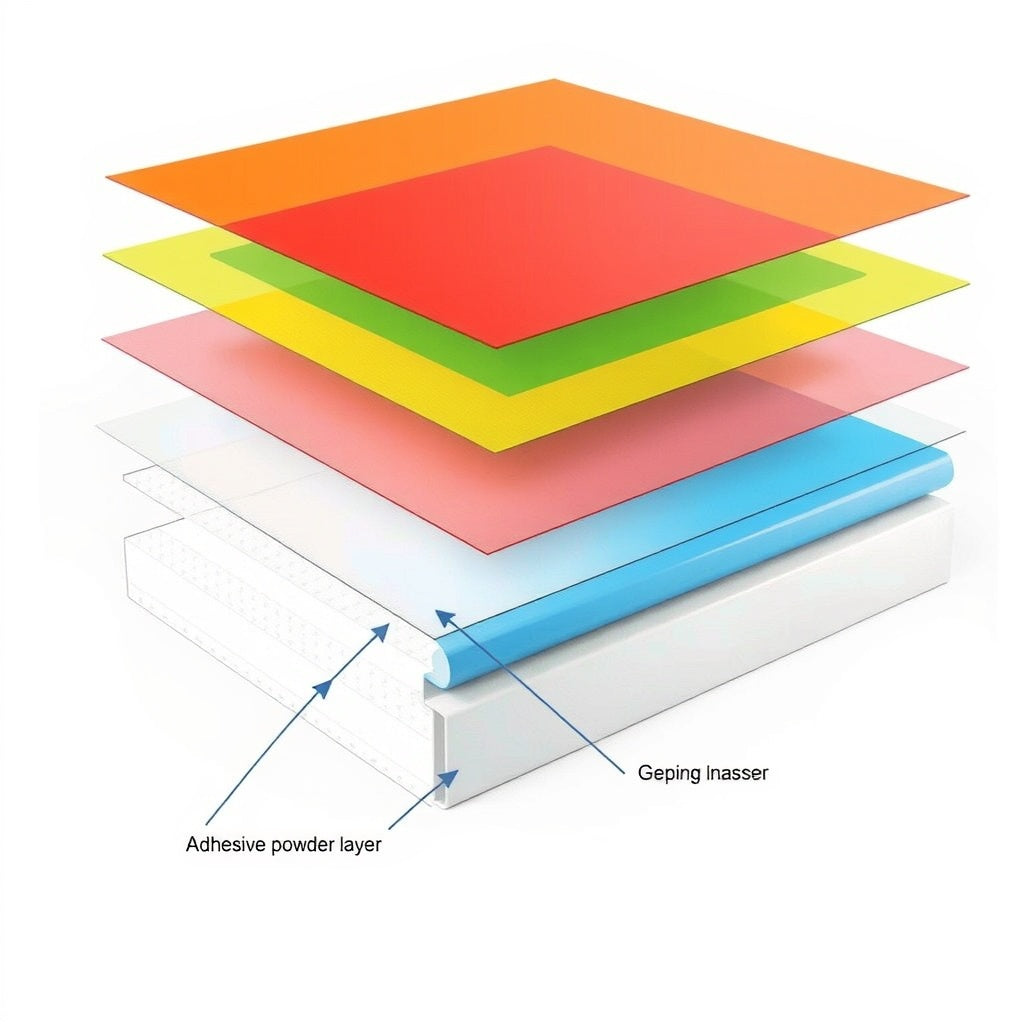
DTF printing follows a specific layer order. First, the CMYK color inks (cyan, magenta, yellow, black) are printed onto the PET film in reverse. Then the white ink layer prints on top of the color layer. When you heat-press the transfer onto a garment, the white layer ends up between the fabric and the color layer — creating a bright, opaque foundation that lets every color pop regardless of the shirt color underneath.

Why White Ink Is Necessary

Ink is translucent by nature. If you printed colored ink directly onto dark fabric, the fabric color would bleed through and alter every color in your design. A red logo on a black shirt would look nearly black. Yellow text on navy fabric would be invisible. The white underbase blocks the garment color completely, giving the CMYK inks a clean white canvas to display their true colors — similar to how artists prime a canvas white before painting.

White Underbase vs. White Ink in the Design

There's an important distinction between the automatic white underbase and white elements in your design. The underbase is a solid white layer that covers the entire design area — you don't need to add it yourself. White areas in your actual design (white text, white backgrounds, white graphic elements) are part of the color layer and display as visible white on the finished garment. Both use white ink, but they serve different purposes.

How the White Underbase Affects Print Quality

Color Accuracy

The white underbase is the single biggest factor in color accuracy for DTF transfers. A properly applied underbase ensures that a red stays red whether it's pressed onto a white tee, a black hoodie, or a heather gray crewneck. Without adequate white coverage, colors shift toward the garment color — especially noticeable with lighter colors like yellow, pink, and light blue that lack the pigment density to overpower dark backgrounds on their own.

Vibrancy and Saturation

Thicker white underbase layers produce more vibrant colors because more of the garment color is blocked. However, there's a tradeoff — thicker white layers also make the transfer feel stiffer on the fabric. Professional DTF printers calibrate the white layer thickness to balance color vibrancy against hand feel, finding the sweet spot where colors pop without creating a heavy, plasticky print.

Detail and Edge Sharpness

The underbase affects how crisp your design edges appear. If the white layer extends beyond the color boundaries, you'll see a visible white border around your design — called "white bleed" or "white outline." If the white layer is too small, color edges will fade into the garment color. Precise alignment between the white and color layers is critical for professional-looking transfers with clean edges.

White Underbase Settings and Options

Full Coverage Underbase

The standard approach: a solid white layer covers the entire design area. Every pixel with color gets white underneath. This provides maximum color accuracy and works for all garment colors. It's the default setting for most DTF printing because it guarantees consistent results regardless of what color shirt you're pressing onto.

Spot Underbase

Some designs benefit from selective white coverage. A spot underbase only applies white under specific areas — typically under light colors that need the most help on dark garments, while skipping areas with dark colors that already have enough pigment density. This reduces ink usage and creates a softer feel in areas without white backing.

Variable Density Underbase

Advanced DTF RIP software can adjust white ink density across different areas of a design. Light colors like yellow get 100% white coverage for maximum opacity, while dark colors like black or navy get reduced white (50-70%) since they don't need as much contrast support. This approach optimizes both color accuracy and print feel simultaneously.

No Underbase (White Garments Only)

When printing transfers exclusively for white or very light garments, some printers offer the option to skip the white layer entirely. This produces the softest possible transfer but limits the garment colors you can use. Without the underbase, the same transfer on a dark shirt would look washed out and translucent. This option only makes sense if you're certain about the garment color before ordering.

Common White Underbase Problems and Solutions

Problem: White Border Around Design Edges

A visible white outline appears around your design on the garment. This happens when the white layer is slightly larger than the color layer. Causes include software choke settings that are too aggressive or misalignment between print heads. Solution: at the design level, ensure your artwork has clean, crisp edges with no anti-aliasing artifacts. At the printer level, proper choke values (typically 1-3 pixels inward) prevent white from peeking past color boundaries.

Problem: Colors Look Dull or Washed Out

If colors appear muted or the garment color shows through, the white underbase is too thin. This is especially noticeable with yellows, light pinks, and pastel colors on dark garments. Solution: increase white ink density or add a second white pass. If ordering transfers, specify that you'll be pressing onto dark garments so the printer can optimize white coverage accordingly.

Problem: Transfer Feels Thick or Stiff

An overly thick white layer creates a heavy, rubbery feel on the garment. The transfer feels like a patch rather than an integrated print. Solution: reduce white ink density, especially under dark-colored areas of the design that don't need heavy white support. Variable density settings solve this by applying white only where needed. Proper curing temperature and pressure also affect the final hand feel.

Problem: White Shows Through on Light Garments

On white or very light garments, the white underbase shouldn't be visible — but sometimes a slight white rectangle or outline appears around the design. This indicates the white layer extends beyond the design boundaries. Solution: ensure the white layer is precisely masked to the design area with appropriate choke applied. A proper DTF workflow generates the white layer directly from the design transparency, so only areas with actual design content receive white ink.

How Design Choices Affect the Underbase

Transparent vs. Opaque Areas

The white underbase only applies to non-transparent areas of your design. This is why DTF artwork must be PNG with transparent background — the transparency tells the printer exactly where to apply white ink. Any white background in your file will be treated as a design element and receive its own white underbase, creating a visible white rectangle around your design on the garment.

Semi-Transparent Effects

Soft shadows, gradients that fade to transparent, and semi-opaque effects require proportional white underbase. A 50% transparent shadow gets 50% white coverage, allowing some garment color to blend through. This creates natural-looking effects but means the shadow will look different on a white shirt versus a black shirt — by design. Understanding this helps you set realistic expectations for designs with transparency gradients.

Color Selection and Contrast

Designs with primarily dark colors (black, navy, dark green) are less dependent on the white underbase for visual impact. Designs heavy on light colors (yellow, pink, light blue, white) are almost entirely dependent on it. If your design uses many light colors and will be pressed onto dark garments, the white underbase quality becomes the determining factor in whether your print looks professional or amateur.

White Underbase and Garment Color Pairing

  • Dark garments (black, navy, dark gray): Full white underbase essential. Every color in the design needs solid white backing. This is where white underbase quality matters most — any gaps or thin spots show immediately.
  • Medium garments (red, royal blue, forest green): Full underbase recommended. Medium-dark garments still affect color perception significantly. A red shirt will make blues look purple and yellows look orange without proper white isolation.
  • Light garments (heather gray, light blue, pink): Full underbase provides best results but some designs look acceptable with reduced white density. Light garments cause less color shift, giving more flexibility.
  • White garments: Underbase optional. Colors print accurately without white backing since the garment itself provides a white foundation. Skipping the underbase creates the softest possible transfer.

Why InkMerge Handles the Underbase for You

InkMerge takes the complexity out of white underbase management:

  • Automatic optimization: Our RIP software analyzes each design and generates the ideal white underbase — proper density, precise masking, and appropriate choke for clean edges
  • Dark garment ready: Every transfer is printed with full underbase coverage suitable for any garment color, so you're never limited in your color choices
  • Color accuracy guarantee: CMYK + white ink system with calibrated white underbase reproduces your design colors faithfully across every order
  • No extra charge: The white underbase is included in the standard $0.02 per square inch pricing — no setup fees or white ink upcharges
  • Gang sheet compatible: Multiple designs with different underbase requirements can share the same gang sheet without compromising quality

Frequently Asked Questions

Do I need to create a white underbase layer in my design file?

No. The white underbase is generated automatically by the DTF printer's RIP software based on your design's transparency. Just submit a 300 DPI PNG with transparent background and the printer handles the rest. Adding a white layer manually can actually cause problems by creating double white coverage.

Will my transfer work on both light and dark shirts?

Yes. DTF transfers with full white underbase work on any garment color. The white layer ensures your colors look correct whether pressed onto a white tee or a black hoodie. This is one of DTF's biggest advantages — one transfer works universally across all garment colors.

Does the white underbase make transfers feel thick?

Modern DTF transfers are thinner and softer than many people expect. While the white layer does add some thickness compared to printing without it, properly manufactured transfers maintain a soft hand feel that's comfortable to wear. The white underbase is typically 10-15 microns thick — barely perceptible by touch on the finished garment.

Can I get transfers without white underbase for white shirts?

Some DTF providers offer this option, but it limits your garment color flexibility. If you order transfers without white underbase and later decide to press them on a dark shirt, the results will be unusable. InkMerge includes the white underbase on all transfers so you have maximum flexibility at no extra cost.

Why do some of my colors look different on dark vs. light shirts?

Even with a white underbase, subtle color differences can occur between garment colors due to the pressing environment. Heat press temperature, pressure, and the garment's fabric composition all slightly influence the final color appearance. However, with a properly optimized white underbase, these differences are minimal and not noticeable under normal viewing conditions.

← Back to DTF Printing Guides